Verified account
Snapchat PFP Viewer
Enter a public Snapchat username or Profile link to see the available profile picture beside the Profile name.
Snapchat public media downloader
0 selected
No public content found
This profile does not currently have public media in this section.
Download
Open the collection to view and select every item.
View a public Snapchat profile picture
The Snapchat PFP viewer shows the main picture available for a public Profile. PFP, profile pic and avatar are common names for that image; DP and profile photo are also used. Enter the exact username or Profile link to make sure you are viewing the right person or publisher.
The picture appears as a small avatar beside the Profile name. Check that name and the username together before deciding whether it is the person you meant. A wide banner or Snapcode download action may also be present, but neither is another version of the PFP.
You do not need to sign in to check an available public picture. If the result shows only letters beside the name, no avatar was found for that lookup. Try the exact Profile link if you are unsure about the username. A banner can still be present even when the main picture is missing.
How to view a Snapchat PFP
Use the exact public username or full Profile URL. A display name is not enough because many people can use the same name, while the username identifies the intended public Profile.
No Snapchat sign-in is required for an available public PFP. That does not provide access to a private account or make unavailable images visible; it only lets you inspect the images shown on the supported public page.
Enter the exact public username or paste the full Profile link, then select Find media.
Enter a username or Profile link 
Confirm the display name and username for the public Profile.
Confirm the public Profile 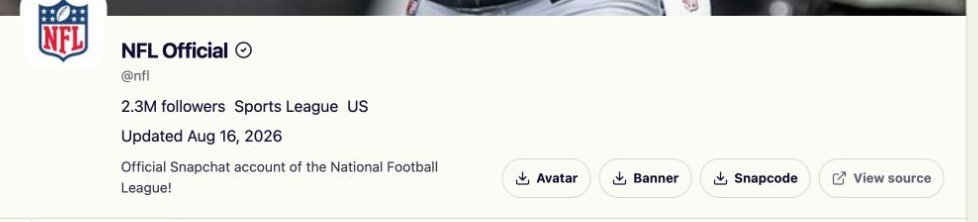
Look at the avatar beside the Profile name. If letters appear instead, no public avatar was found for that result.
View the avatar beside the Profile name
Check the profile picture you came to see
A username or public Profile link helps identify the account; the avatar helps you recognize it.
Check a shared Profile
Paste the public Profile URL and compare its username with the account someone sent you.
Look up a known username
Use the exact username rather than a display name shared by several people.
Recognize a missing picture
A letter placeholder is not a hidden avatar. It means there is no public image to show in that result.
Decide whether to save it
Viewing the small avatar does not download it. The separate Avatar action is available if you also need the file.
Snapchat PFP viewer FAQ
- Which Snapchat links can I use?
- Enter a public username, Profile URL, supported share link, Highlight link or Spotlight link. Some publisher Story links containing /p/ are also supported. Results may include public videos, photos and profile pictures, depending on what Snapchat currently makes available.
- Do I need to sign in to Snapchat?
- No. The tool works with public data and does not ask for Snapchat account credentials. It cannot use this access to open private content.
- Can it recover private, deleted or expired media?
- No. If an item is not publicly available, the tool cannot recover it. Private, removed and expired media remains unavailable.
- Does the tool change quality or remove watermarks?
- The tool does not add or remove watermarks, sharpen photos or increase video resolution. Existing marks remain. Most files download directly; some supported videos are first prepared as an MP4 in your browser. Preparing an MP4 does not create a higher-quality version.
- How do multiple downloads work?
- Selected items are saved as separate files, not a ZIP. Your browser may ask you to allow multiple downloads. Videos that need preparation use temporary browser memory before saving; the site does not keep a hosted media archive. Check your browser's download list for saved files.
- May I reuse the downloaded media?
- Only when you have permission and a lawful reason to do so. Public availability does not transfer ownership or reuse rights.
- Is a Snapchat PFP always a Bitmoji?
- No. The public avatar used by a Profile may vary, and the viewer shows the image that is currently available.
- Why do I see letters instead of a profile picture?
- Letters are a placeholder when no public avatar is available. They are not an image you can reveal by clicking. Check the username or try the exact public Profile link. A visible banner does not mean that an avatar must also be available.
- Should I enter a username or a profile-picture URL?
- Use a public Snapchat username or Profile page URL. The tool finds the avatar connected to that Profile; it does not accept an uploaded image or use a picture to search for a person. If you only have a display name, first find the exact username or ask for the public Profile link.
- Does the PFP viewer show old Profile pictures?
- No. It is not an avatar history tool. It shows the current public Profile images available at the time of the lookup and cannot recover a picture that was replaced or removed.
- Can I enlarge a Snapchat PFP with this viewer?
- Not within the current viewer. It shows a small avatar in the Profile summary, with no click-to-enlarge control or pixel-size readout. If you want to inspect the available file more closely, use the separate Avatar download action and open the saved image on your device. This does not create a higher-resolution version.
- What is the difference between PFP Viewer and Profile Viewer?
- A PFP is the single picture beside the Profile name. A Profile includes that picture plus public details and any available Story, Highlight or Spotlight collections. Both pages use the same tool; the PFP instructions help you find the image, while the Profile Viewer guide explains the rest of the result.
What the avatar preview can tell you
The avatar helps you recognize a Profile, but the picture alone does not establish who owns the account. Compare it with the username and public details rather than assuming that two similar pictures belong to the same person. A Bitmoji avatar is shown as one picture; the viewer cannot separate its layers or create a new pose.
The Profile's Story, Highlights and Spotlight may appear below the summary because the tool can also find public media. You do not need to open those tabs to see the avatar, and a missing Story does not mean the PFP is missing. Use Profile Viewer for the rest of the public information or Profile Picture Downloader for guidance on saving the avatar.